


3D Cribbage Studio Subscription
3D Cribbage Studio Subscription
Couldn't load pickup availability
Product Description: 3D Cribbage Studio
The Ultimate Web-Based 3D Parametric CAD Studio for Custom Board Design, Manufacturing, and Simulation.
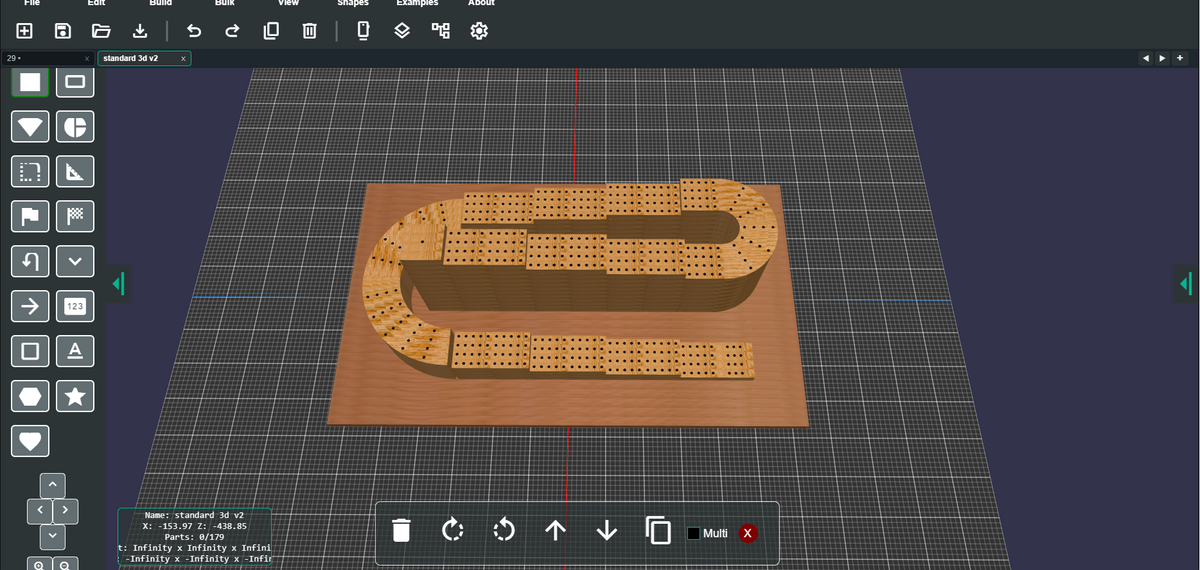
The 3D Cribbage Board Builder is an all-in-one, browser-based 3D CAD and simulation platform designed specifically for creating custom Cribbage boards, intricate woodworking templates, 3D-printable game boards, and CNC manufacturing files. Powered by WebGL and Babylon.js, it offers an intuitive visual editor backed by powerful parametric modeling tools.
Share


Features
🎯 Advanced Cribbage Track & Hole Generator
- Flexible Lane Layouts: Parametrically generate 2-player, 3-player, 4-player, or custom multi-lane tracks with automatic peg hole alignment and spacing.
- Custom Hole Configurations: Fine-tune hole counts (standard 120-hole tracks, 60-hole tracks, or custom counts), start hole positions, finish/win holes, and skunk lines.
- Automated Track Numbering: Insert auto-sequenced numbers along tracks with custom fonts, text sizing, depth extrusion, and orientation alignment along curves.
💾 Data Manager Overview & Capabilities
The Data Manager is the core client-side data persistence and workspace storage engine of the application. Built on top of high-performance browser IndexedDB technology paired with an in-memory cache, it manages all persistent application states, user preferences, workspace tab history, and stored design libraries.
1. ⚡ High-Speed Caching & Storage Architecture
- Instant In-Memory Cache: Upon application startup, the Data Manager loads all stored entries into an in-memory Map cache. This provides instant, synchronous access to settings, panel configurations, and design states without lag or asynchronous render delays.
- IndexedDB Persistence: All setting modifications, tab state updates, and design saves are asynchronously committed to browser IndexedDB storage (idb-keyval). Your work, panel layouts, and preferences are automatically preserved across browser refreshes or sessions.
2. 🔄 Automatic Session & Workspace Recovery
- Multi-Tab Session Preservation: Automatically records all open design tab names, canvas states, and workspace tabs (default/lastDesign). When you re-open the application, your entire workspace—including all open design tabs and active tools—is seamlessly restored.
- UI & Tool Preference Memory: Remembers UI panel widths, toolbar expansion states, snapping increments, grid parameters, material selections, and user options automatically.
3. 📤 Data Manager Export
- Full Application Backup: Allows users to export the entire Data Manager store—including all saved designs, workspace configurations, custom templates, and user preferences—into a single portable .json backup file.
- Cross-Device Transfer: Enables users to easily back up their entire design environment or transfer their workspace settings and saved board templates from one computer or browser to another.
4. 📥 Data Manager Import
- One-Click Workspace Restoration: Allows users to upload a previously exported Data Manager JSON file.
- Seamless Syncing: Restores all stored design keys, user preferences, custom materials, and tab configurations into IndexedDB, automatically updating the active application workspace without requiring a manual reset.
✏️ Built-in 2D SVG Vector Drawer & Path Editor
- In-App Vector Drawing: Draw custom 2D vector shapes, bezier curves, arcs, and freeform paths directly within the application using an integrated vector editor.
- Instant Extrusion & Path Tracking: Convert custom 2D vector art instantly into extruded 3D board elements or guide paths for peg tracks.
🪵 Realistic Wood Material & Color Customization
- Rich Wood Grain Library: Apply realistic high-resolution wood textures including Red Oak, Baltic Birch, American Walnut, Maple, Honduras Mahogany, Cherry, Jarrah, White Oak, Teak, Zebrawood, Purple Heart, Redwood, Poplar, and Hickory.
- Individual Lane & Component Coloring: Independently customize colors, textures, and finishes for individual tracks, board layers, numbers, and accents.
- Color Scheme Presets: Choose from curated harmonious color palettes or create custom color themes.
📦 Embedded Peg Storage & Box Compartment Designer
- Underside Storage Recesses: Parametrically design embedded peg storage pockets directly into the bottom of the board.
- Hardware & Closure Customization: Add sliding lids, finger pulls, and magnetic catch recesses tailored for physical woodworking and assembly.
🎮 Interactive 3D Peg Game Simulator
- Real-time Gameplay Testing: Test and play actual games of Cribbage directly on your custom 3D board design.
- Interactive Peg Animations & Score Tracking: Features animated peg movements, automatic pegging logic, scoreboards, and simulation controls to preview board ergonomics before manufacturing.
Multi-Tab Workspace & Non-Destructive Workflow
- Multi-Tab Design Environment: Work on multiple design projects simultaneously using an interactive tabbed toolbar.
- Session Persistence & Auto-Save: Automatically saves open workspace states and seamlessly restores tabs, history, and canvas progress across browser sessions.
- Hierarchical Design Explorer & Layers: Inspect and organize board components, tracks, text elements, and layers using a tree-view panel.
- Unlimited Undo/Redo: Full non-destructive editing history with step-by-step state restoration.
🛠️ Manufacturing & Multi-Format CAD Export
- 3D CAD & CNC Formats: Export ready-to-manufacture files for 3D printers and CNC routers in STL, OBJ, and 3MF formats.
- Project State Files: Save and load native editable project JSON files.
- Media & Marketing Export: Render high-resolution PNG screenshots, record WebM video walkthroughs, and generate smooth 360° turntable animations for client presentation or product listings.
🎯 Target Audience & Use Cases
- Woodworkers & CNC Machinists: Design precision toolpaths and templates for CNC routing custom hardwood boards.
- 3D Printing Enthusiasts & Makers: Create and export print-ready STL/3MF files for desktop 3D printing.
- Custom Board Game Crafters & Designers: Prototype unique board shapes, track layouts, and branded gift items.
- Commercial Producers: Batch produce custom multi-player Cribbage boards with customized branding, logos, and storage features.
3D Shapes & Components
🏁 Track & Peg Lane Shapes
- Rectangle: Multi-lane straight rectangular track sections. Allows customizable length, width, row counts, hole spacing, and hole quantities per row.
- Single Row: A single-line peg track segment used for individual player lanes, connector tracks, or custom layout extensions.
- Circle: Concentric circular track loops with customizable diameter, sweep angle, player lane offsets, and radial peg hole density.
- Wedge / Pie: Fan-shaped wedge track segment for radial corners, curved turnarounds, or pie-chart style board layouts.
- Rounded Corner: Smooth 90-degree curved corner track module designed to seamlessly connect straight rectangular track sections.
- Square Corner: Sharp 90-degree corner track module for traditional square-cornered track layouts.
- Half Square / U-Turn: U-shaped 180-degree turnaround track section that routes player lanes back in the opposite direction.
- Vee Shape / V-Turn: V-shaped angled track module for chevron, zigzag, or diamond track patterns.
- Start Section: Specialized starting gate track module with starting peg holes (2–4 holes per lane) and customizable starting labels.
- End / Finish Section: Specialized game finish module containing the winning hole indicators, game-winning peg slots, and skunk line markers.
- Arrow: Directional arrow track segment indicating game directional flow along player lanes.
🪵 Base Board & Structural Shapes
- Base Board: The primary solid base board chassis. Features parametric controls for length, width, thickness, chamfer/fillet bevels, and wood material textures.
- Peg Storage Box: Embedded peg compartment cavity carved into the underside of the base board with sliding lid grooves, finger pulls, and magnet slots.
- Rounded Rectangle: Extruded rectangular shape with smooth, adjustable corner radiuses.
- Multiple Sides / Polygon: Regular N-sided polygon shape (Hexagon, Octagon, Pentagon, Heptagon, etc.) with customizable side count, radius, and extrusion depth.
- Star: Parametric star shape with customizable point count (5-point, 6-point, 8-point, etc.), inner/outer radii, and extrusion height.
♠️ Text, Numbers & Graphics Shapes
- Track Numbers: 3D embossed or engraved track numbers (e.g., 5, 10, 15... 120) with customizable font, scale, depth, and rotation.
- 3D Text: Custom extruded 3D text objects for personalizing boards with names, dates, family crests, or custom messages.
- Card Suits: Extruded 3D playing card suit emblems (Spades ♠, Hearts ♥, Clubs ♣, Diamonds ♦) used for board decoration, track accents, or custom game markers.
- Custom Image Shape: Image-textured 2D/3D component for importing and applying graphic images or branding onto board surfaces.
- Custom SVG Shape: Extruded 3D geometry generated directly from custom 2D SVG vector path data.
- 3D STL Model Mesh: Imported 3D mesh model component loaded from external STL files.
- Custom Component: User-defined composite shape component grouping multiple primitive shapes and tracks into a reusable template.
File Import Options
📁 Direct Multi-Format File Import
- JSON & CCB Project Files (.json):Function: Loads native 3D project files.Details: Restores the complete parametric scene tree, including track configurations, hole arrays, layer metadata, custom wood textures, and history state.
- SVG Vector Files (.svg):Function: Imports 2D Scalable Vector Graphics.Details: Automatically parses 2D vector path outlines and extrudes them into 3D solid board geometry or converts them into custom peg track guide paths.
- STL 3D Models (.stl):Function: Imports 3D Stereolithography mesh models.Details: Loads external 3D CAD meshes directly onto the board layout (ideal for adding 3D relief carvings, custom logos, or decorative 3D figures).
- GLB & GLTF 3D Models (.glb, .gltf):Function: Imports binary and text glTF 3D models.Details: Preserves embedded PBR materials, textures, colors, and 3D geometry for high-fidelity model integration.
- Raster Images (.png, .jpg, .jpeg):Function: Imports graphic images.Details: Applies custom graphic decals, family photos, logos, or texture overlays directly onto board faces.
- ZIP Archives (.zip):Function: Imports multi-file project archives.Details: Automatically extracts and loads multi-part board projects, layer stacks, or shared design packages.
🔤 SVG Code Import
- Function: Paste raw SVG vector code directly into the app.
- Details: Features a dedicated text modal where users can paste raw XML/SVG string data copied from vector graphic software (Adobe Illustrator, Inkscape, Figma). The app parses the path geometry in real-time and extrudes it into 3D board elements.
✉️ Emailed ZIP & Shared Project Import
- Function: Merges shared or emailed project packages into the active workspace.
- Details: Opens a dedicated import dialog to unpack compressed design bundles received via email or shared across client teams, inserting the new design into the active design tab or a new workspace.
💾 Data Manager Storage Import
- Function: Restores saved projects and template libraries from local storage backups.
- Details: Manages local browser storage backups, importing saved design keys, custom presets, wood material libraries, and historical project backups into the application workspace.
File Export Options
3D Model & Manufacturing Export Formats
STL (.stl) — Standard 3D Printing & CNC Mesh
- Primary Use: 3D Slicers (Cura, PrusaSlicer, Bambu Studio) and CNC CAM software (VCarve, Aspire, Fusion 360).
- Details: Generates solid triangulated 3D mesh geometry of the entire board layout, including track lanes, peg holes, extruded 3D text, numbers, and base board contours.
- Best For: Rapid 3D printing and toolpath generation for CNC routers.
3MF (.3mf) — Modern 3D Manufacturing Format
- Primary Use: Advanced multi-color / multi-material 3D printing (Bambu Lab AMS, Prusa MMU, Ultimaker).
- Details: A modern, lightweight XML-based 3D file format that packages complete mesh geometry, color data, material definitions, and unit scales into a single compressed container.
- Best For: High-precision 3D printing with reduced file size and multi-material printing support.
OBJ (.obj) — Universal 3D Mesh Exchange
- Primary Use: 3D Modeling (Blender, Maya, Rhino), CAM software, and rendering engines.
- Details: A universal, human-readable 3D geometry format compatible with virtually all 3D CAD, CGI, and visualization software.
- Best For: Importing board models into third-party CAD software for further artistic detailing or rendering.
GLB (.glb) — Web & AR Binary glTF Format
- Primary Use: Augmented Reality (AR), WebGL viewers, Unity, Unreal Engine, and interactive web displays.
- Details: Binary glTF format that embeds 3D mesh geometry, PBR (Physically Based Rendering) wood textures, and color properties in a single compact file.
- Best For: Web previews, digital storefronts, AR mobile viewing, and interactive web applications.
ZIP Archive (.zip) — Multi-Part Batch Model Bundle
- Primary Use: CNC machining of multi-part assemblies and multi-component 3D printing.
- Details: Packages all individual board components, base bodies, numbers, and peg storage box parts as separate 3D files in a single compressed ZIP archive.
- Best For: Machining separate physical pieces (e.g., inlay numbers, separate base lids, track inserts).
🗂️ Project & Design State Formats
JSON Design Files — Native Project State
- Primary Use: Saving, reloading, and sharing editable project files.
- Details: Stores the complete non-destructive parametric project structure—including hole counts, lane dimensions, custom vector paths, wood materials, active settings, and history state.
- Best For: Re-opening designs in the studio for future edits, template libraries, and sharing project files with clients or team members.
📸 Image, Video & Marketing Media Formats
PNG Image (.png) — High-Resolution 2D Snapshot
- Primary Use: Client proofs, marketing listings, and shop production documentation.
- Details: Captures high-definition 2D image renders of the 3D viewport canvas.
- Best For: Generating product catalog photos, social media posts, and client approval sheets.
WebM Video Walkthrough (.webm) — HD Video Recording
- Primary Use: Video marketing, product demonstrations, and simulation playback.
- Details: Records smooth high-definition video of camera pans, game simulations, and design interactions directly within the browser.
- Best For: Creating promotional videos and interactive gameplay preview clips.
360° Turntable Camera Animation (.webm / ZIP)
- Primary Use: E-commerce 360-degree product showcases.
- Details: Rotates the 3D camera 360° around the board while recording a video loop or exporting sequential image frames.
- Best For: E-commerce product listings, interactive product spinners, and portfolio presentations.
Build Tools
🏗️ Build Tools
1. Circle (CircleGroupModal)
- Function: Generates circular peg track groups.
- Capabilities: Customizes track diameter, total hole count, radial spacing, hole sizes, and multi-player lane counts (2, 3, or 4 lanes). Ideal for traditional round continuous-loop Cribbage boards.
2. Arc (ArcGroupModal)
- Function: Generates curved arc track segments.
- Capabilities: Configures arc radius, start angle, sweep angle, hole counts, and lane spacing. Perfect for creating curved track corners, S-curves, or crescent board layouts.
3. Oval (OvalGroupModal)
- Function: Generates elliptical and oval track layouts.
- Capabilities: Parametrically controls major and minor axis dimensions, track loop spacing, hole intervals, and lane configurations for oval-shaped boards.
4. Spiral (SpiralGroupModal)
- Function: Generates spiral peg track layouts (coiling inward or outward).
- Capabilities: Adjusts inner/outer radii, number of spiral revolutions, hole density, and multi-player lane spacing. Great for compact or artistic spiral track boards.
5. Rectangle (RectangleGroupModal)
- Function: Generates rectangular track groups and straight track sections.
- Capabilities: Configures track length, width, corner styles (square or rounded corners), holes per side, and player lane offsets. Used for standard 2-track and 3-track rectangular Cribbage boards.
6. Base (BaseModal)
- Function: Generates the primary solid 3D base board.
- Capabilities: Selects base board shapes (Rectangle, Circle, Oval, Rounded Corner, Star, Custom), specifies overall board length, width, thickness, edge bevels/fillets, and wood material textures.
7. Box (BoxModal / PegStorageModal)
- Function: Designs embedded peg storage boxes & underside compartments.
- Capabilities: Parametrically builds storage cavities into the bottom of the board. Configures compartment dimensions, wall thickness, sliding lid grooves, finger pull slots, and magnetic catch recesses for physical hardware.
8. Track Base (buildShapedBase)
- Function: Auto-generates a contoured base board from the current track layout.
- Capabilities: Automatically calculates the boundary margin around all active peg tracks and generates a custom-fitted 3D base board that mirrors the track silhouette.
9. Draw Path (SVGDrawModal)
- Function: Opens the interactive 2D Vector Path Drawer.
- Capabilities: Provides a full visual canvas to draw custom freeform 2D paths, lines, and bezier curves with interactive control points. Custom paths can be converted directly into 3D shapes or track guide paths.
10. Track Path (PathGroupModal)
- Function: Converts vector paths (drawn or imported SVGs) into 3D peg tracks.
- Capabilities: Automatically distributes and aligns peg holes and player lanes along any arbitrary 2D vector path or complex outline.
11. Auto Number (AutoNumberModal)
- Function: Automatically generates and aligns 3D track numbers along peg tracks.
- Capabilities: Configures starting number (e.g. 5, 10, 15... 120), step increments, 3D text extrusion depth, font sizing, and automatic rotational alignment along straight or curved track paths.
Bulk Tools
🔍 Bulk Selection Tools
- Select By Layer (Layers 1–5): Selects all board components and tracks assigned to a specific vertical elevation layer.
- Select By Texture: Selects all parts on the board that share the same applied wood grain texture or material.
- Select Same: Selects all objects in the scene that match the shape type and configuration of the currently active selection.
- Select By Shape: Selects all objects belonging to a specific shape type across the entire board (e.g., Rectangle, Single Row, Circle, Wedge, Rounded Corner, Square Corner, Half Square, Vee Shape, Start, End, Rounded Rectangle, Number, Text, Arrow, Star, Card Suit, Component, or Parts).
- Select Same Rotation: Selects all board parts sharing the exact same orientation angle.
🎨 Bulk Material & Color Customization
- Apply Color Scheme (ColorSchemeModal): Batch applies pre-configured multi-color palettes to all selected track shapes and components.
- Lane Colors / Textures (BulkLaneColorModal): Opens a batch manager to assign distinct wood textures or solid colors to specific player lanes across all selected track groups simultaneously.
- Clear Colors: Clears custom color overrides from selected parts, restoring default wood materials.
- Set Lane Color (On / Off): Enables or disables solid lane coloring across all selected track groups.
- Set Lane Texture (On / Off): Enables or disables wood grain texturing across all selected player lanes.
📐 Bulk Parametric & Geometry Editing
- Fill Base: Automatically fills the inner boundaries of selected track paths or shapes to create solid base board geometries.
- Embed (Subtract): Performs 3D boolean subtraction to embed or carve selected peg tracks, numbers, or storage pockets directly into base board surfaces.
- Set Holes (Yes / No): Batch toggles peg hole generation on or off across selected track shapes.
- Set Rows (1–8): Simultaneously updates the number of parallel track rows across selected shapes.
- Set Row Holes (1–8): Batch adjusts the number of holes per row segment across selected shapes.
- Set Height (1–12): Batch modifies the 3D extrusion height (thickness) of selected components.
- Set Layer Height (1.5–10): Adjusts the vertical stack offset height across multi-layered board structures.
- Set Inside Lanes (1–8): Batch updates the number of inner player track lanes across selected shapes.
- Set Pickable (Yes / No): Toggles whether selected components can be targeted or clicked in the 3D interactive viewport (useful for locking background boards while working on tracks).
🥞 Bulk Layer & Stack Management
- Reverse Layers: Flips the vertical stacking order of selected multi-layered board components.
- Step Layers (StepLayersModal): Automatically steps and offsets the vertical elevation of selected components in progressive increments (ideal for tiered, 3D stepped, or multi-level boards).
- Reorder Parts: Launches an interactive visual mode to re-sequence object hierarchy and stack order.
- Set Layer (Reset, 1–5): Assigns selected parts directly to a specific layer elevation.
- Move Layer Up (2–7): Increments the layer index of selected components upwards to higher stack tiers.